9. Saving data
If you close the counter page and open it again, the count is back at zero: state only lives while the page is open. What has to last, such as tasks, orders or grades, belongs in a table.
جدول
جدول كتاب {
    العنوان: نص
    المؤلف: نص
    مقروء = خطأ
}

كتاب.أنشئ(العنوان: "الأيام"، المؤلف: "طه حسين")
كتاب.أنشئ(العنوان: "موسم الهجرة إلى الشمال"، المؤلف: "الطيب صالح")
ثابت الثلاثية = كتاب.أنشئ(العنوان: "ثلاثية غرناطة"، المؤلف: "رضوى عاشور")
الثلاثية.نسخة(مقروء: صح).احفظ()

اطبع("عدد الكتب:"، كتاب.عدد())
لكل ب في كتاب.الكل() {
    ثابت العلامة = إذا ب.مقروء { "✓" } وإلا { "·" }
    اطبع(العلامة، ب.رقم، ب.العنوان، "—"، ب.المؤلف)
}
اطبع("المقروءة:"، كتاب.حيث { هو.مقروء }.حول { هو.العنوان })
عدد الكتب: 3
· 1 الأيام — طه حسين
· 2 موسم الهجرة إلى الشمال — الطيب صالح
✓ 3 ثلاثية غرناطة — رضوى عاشور
المقروءة: [«ثلاثية غرناطة»]
جدول كتاب { … }(«table book») describes records the wayنوعdoes. Each field has a type (العنوان: نص, the title) or a default its type comes from (مقروء = خطأ, «read» is false).- Ḍād adds a field called
رقم(«number») to every record, and gives it a new value when the record is saved. كتاب.أنشئ(…)creates a record and saves it,كتاب.الكل()returns all of them,كتاب.حيث { … }the ones the condition is true for, andكتاب.بالرقم(2)a single one.السجل.احفظ()saves what changed, andالسجل.احذف()deletes the record.
Run the program twice with dad run and look at «عدد الكتب» (the number of books): it doesn't
go back to three, it grows, because the books are saved. Ḍād keeps the data in a file next
to your program, in a folder called .dad. Delete that folder to start again.
A to-do app
Let's put together everything you have learned in a real app: a table of tasks, functions that run on the server, and a page.
جدول مهمة {
    العنوان: نص
    منجزة = خطأ
}

خادم دالة كل_المهام() = مهمة.الكل()
خادم دالة أضف(العنوان: نص) = مهمة.أنشئ(العنوان: العنوان)
خادم دالة بدّل(م: مهمة) = م.نسخة(منجزة: ليس م.منجزة).احفظ()
خادم دالة امسح_المنجزة() = مهمة.حيث { هو.منجزة }.لكل { هو.احذف() }

مكون الرئيسية {
    حالة المهام = كل_المهام()
    حالة الجديدة = ""

    عمود {
        ثابت الباقية = المهام.عدد { ليس هو.منجزة }
        ثابت فيها_منجزة = الباقية < المهام.عدد
        عنوان("مهامي ({الباقية} باقية)")
        صف {
            حقل(الجديدة، تلميح: "مهمة جديدة…")
            زر("أضف"، معطل: الجديدة.قص() == "") {
                أضف(الجديدة.قص())
                الجديدة = ""
                المهام = كل_المهام()
            }
        }
        لكل م في المهام {
            مربع_اختيار(م.منجزة، نص: م.العنوان) {
                بدّل(م)
                المهام = كل_المهام()
            }
        }
        إذا فيها_منجزة {
            فاصل()
            زر("امسح المنجزة") {
                امسح_المنجزة()
                المهام = كل_المهام()
            }
        }
    }
}
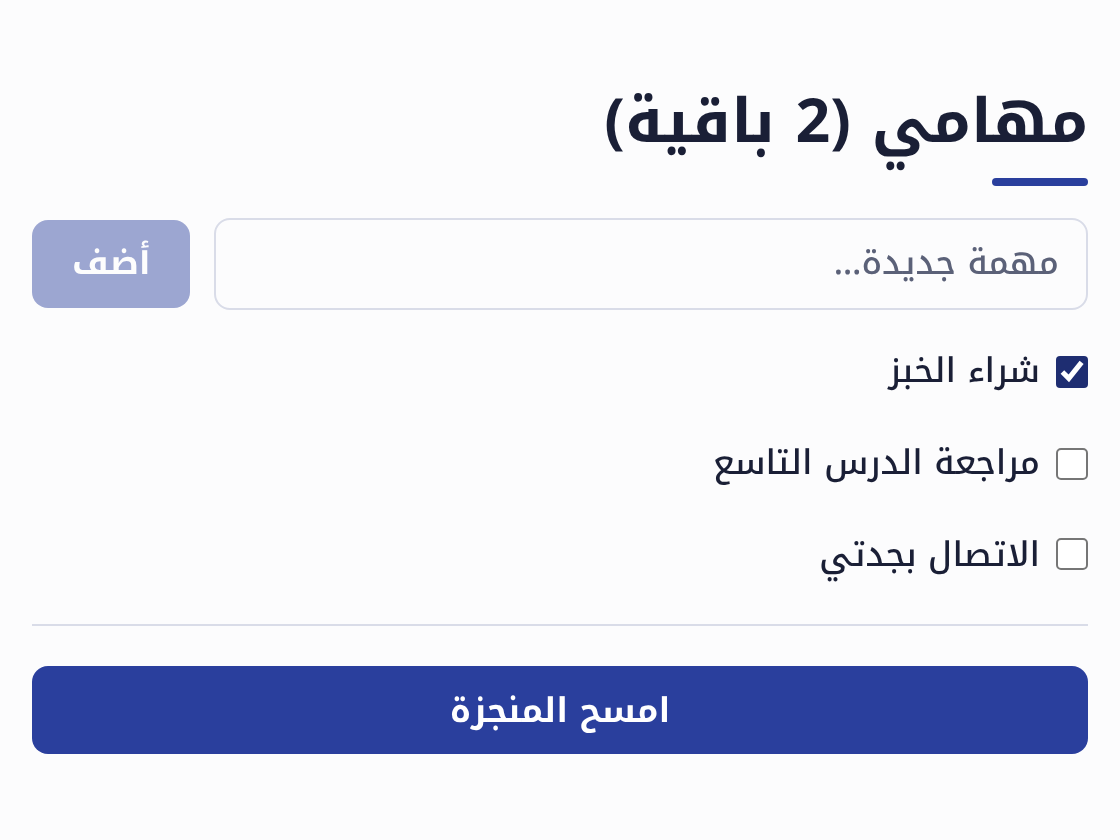
What's new here?
- A
خادم دالةis a function that runs on the server, where the table is. The page calls it like any other function. - After each change we read the tasks again:
المهام = كل_المهام(). The state changes, and the page is drawn again. مربع_اختيار(م.منجزة) { … }gives you a place to write what happens when it is clicked.
Open the app in two windows, add a task in one and reload the other: the task is there, because both windows read the same table.
The developer page
While dad dev runs, open http://localhost:8080/_dad. It shows your tables and what is in
them, and your server functions with a form to try each one. It updates by itself.
Exercise
Add a priority to the to-do app: a field عاجلة = خطأ («urgent»), a check box next to the
new-task field to set it, and show urgent tasks first, with «!» before each title.
Hint
Add عاجلة: منطقي = خطأ to the parameters of أضف, and a state حالة العاجلة = خطأ to
the component. To order the tasks, join two lists:
المهام.رشح { هو.عاجلة } + المهام.رشح { ليس هو.عاجلة }.
Next: Going online