8. Your first page
Until now your programs printed in the terminal. In this lesson you make a web page with buttons and fields, with no HTML and no JavaScript: Ḍād takes care of that, and makes the page right to left, in a fine Arabic typeface.
مكون: a piece of the page
مكون الرئيسية {
    حالة العدد = 0

    عمود {
        عنوان("عدد الضغطات: {العدد}")
        زر("اضغطني") { العدد += 1 }
    }
}
Run it with dad dev instead of dad run:
(Or in Arabic: ضاد تطوير عداد.dad.) Then open http://localhost:8080 in your browser and
click the button: the count in the heading goes up.

Let's read the program:
مكون(«component») describes a piece of the page. The component calledالرئيسية(«the main one») is what you see when you open the page.حالة العدد = 0is a state: a value the component remembers, here the number of clicks. Whenever it changes, the page is drawn again.عمود { … }(«column») puts what is inside it one under the other, andصف { … }(«row») side by side.عنوانis a heading, andزر("اضغطني") { … }is a button labelled «click me»: what's between{ }after it happens when it is clicked.
Leave dad dev running: each time you save the file, the page updates by itself.
The elements
| Element | What it is |
|---|---|
عنوان("…") |
a large heading. عنوان("…"، مستوى: 2) is a smaller one |
فقرة("…") |
a paragraph of text |
زر("…") { … } |
a button. Add معطل: صح to turn it off |
حقل(حالة) |
a place to type, tied to a state. Add تلميح: "…" for faint text inside it |
مربع_اختيار(حالة، نص: "…") |
a check box |
صورة("address") and رابط("text"، "address") |
an image, and a link to a page |
عمود, صف and بطاقة |
group elements: one under the other, side by side, or in a box |
فاصل() |
a horizontal line |
Fields
A field is tied to a state: what you type in it becomes the state's value. This page asks for your name, and greets you in Arabic, or in English if you tick the box:
مكون الرئيسية {
    حالة الاسم = ""
    حالة بالإنجليزية = خطأ

    بطاقة {
        عنوان("ما اسمك؟"، مستوى: 2)
        حقل(الاسم، تلميح: "اكتب اسمك هنا")
        مربع_اختيار(بالإنجليزية، نص: "بالإنجليزية")
        إذا الاسم != "" {
            فقرة(إذا بالإنجليزية { "Hello, {الاسم}!" } وإلا { "أهلاً بك يا {الاسم}!" })
        }
    }
}
Notice that إذا works inside the component as it does anywhere else: the paragraph only
shows once you have typed a name.
Components with parameters
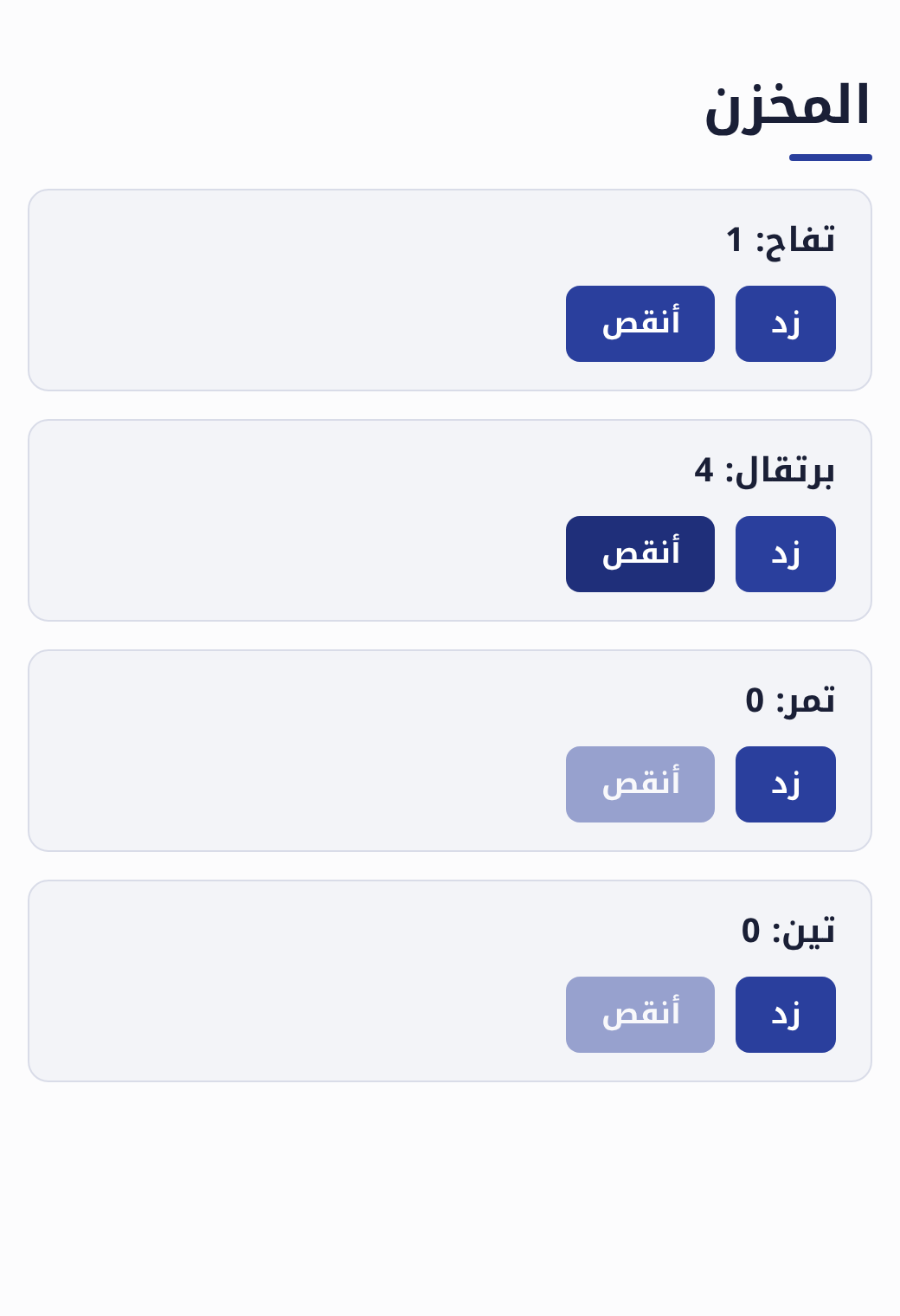
A component is like a function: it takes parameters, and another component uses it. Each copy has its own state. Here is a store with a counter for each fruit:
مكون عداد(الاسم: نص، البداية: صحيح = 0) {
    حالة العدد = البداية

    بطاقة {
        عنوان("{الاسم}: {العدد}"، مستوى: 3)
        صف {
            زر("زد") { العدد += 1 }
            زر("أنقص"، معطل: العدد == 0) { العدد -= 1 }
        }
    }
}

مكون الرئيسية {
    عمود {
        عنوان("المخزن")
        عداد("تفاح")
        عداد("برتقال"، البداية: 5)
        لكل الصنف في ["تمر"، "تين"] {
            عداد(الصنف)
        }
    }
}
Exercise
Make a tip calculator page: a field for the bill, three buttons for 10%, 15% and 20%, and a paragraph that shows the tip and the total.
Solution
مكون الرئيسية {
    حالة الفاتورة = 0.0
    حالة النسبة = 15

    بطاقة {
        عنوان("حاسبة البقشيش"، مستوى: 2)
        حقل(الفاتورة، تلميح: "مبلغ الفاتورة")
        صف {
            لكل ن في [10، 15، 20] {
                زر("{ن}٪"، معطل: النسبة == ن) { النسبة = ن }
            }
        }
        ثابت البقشيش = (الفاتورة * النسبة / 100).تقريب(2)
        فقرة("البقشيش {البقشيش}، والمجموع {الفاتورة + البقشيش}")
    }
}
Start the state at 0.0 rather than 0, so the field knows the bill is a decimal.
Next: Saving data